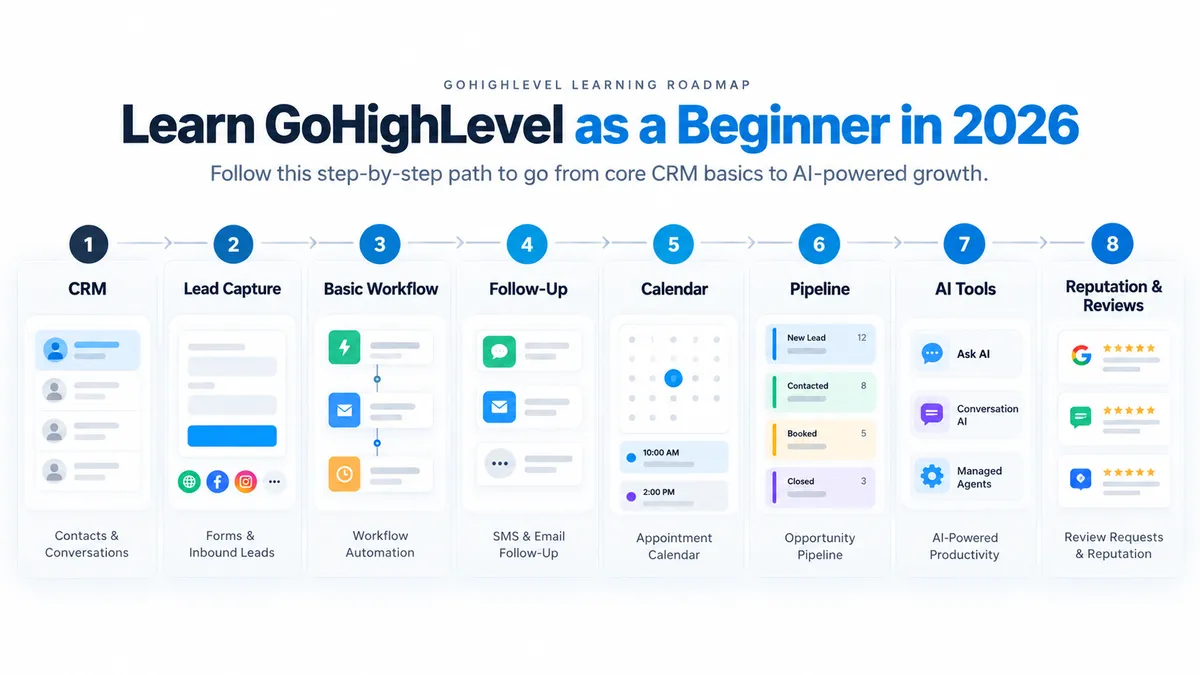
GoHighLevel Bootcamp Guide for Beginners 2026
GoHighLevel Beginner Guide · Updated 2026
GoHighLevel can feel confusing the first time you log in—not because one individual feature is unusually difficult, but because CRM, messaging, calendars, websites, funnels, workflows, reviews and AI tools all live inside the same platform.
The useful question for a beginner is not, “How do I learn every HighLevel feature?”
It is: What should I understand first so I can build one working customer journey without wasting the trial clicking through features I do not need yet?
That is also where the current GoHighLevel Bootcamp offer can be useful. The verified Bootcamp signup path provides an extended 30-day HighLevel trial and access to live guided training, giving a new user more time to become familiar with the platform before deciding whether it fits the business.
Direct Answer
What Is GoHighLevel?
GoHighLevel, commonly called HighLevel or GHL, is a combined CRM, marketing, communications and automation platform.
It combines functions commonly handled through separate tools, including contacts, pipelines, messaging, appointment scheduling, forms, websites and funnels, workflows, reputation management and an expanding set of AI capabilities.
That consolidation is one of HighLevel's strengths, but it is also why the platform can look intimidating at first.
A new user may see contacts, opportunities, conversations, workflows, calendars, sites, reputation tools, automation settings, AI products and agency-level controls before understanding how those pieces relate to one another.
You do not need to learn them all at once.
In the larger Agency AI Lab Authority Tree, HighLevel is best understood as infrastructure that can support customer response and conversion. Visibility, useful content and trust create opportunities. CRM, follow-up, calendars, automation and appropriate AI tools help manage what happens after those opportunities arrive.
30
Current Bootcamp Offer
30 Days Instead of the Standard 14-Day Trial
HighLevel's standard public trial is currently 14 days. The verified Bootcamp signup path currently provides a 30-day trial plus access to a live HighLevel Bootcamp.
HighLevel states that subscription charges do not apply during the 30-day trial, although communication usage charges may apply. Confirm the current signup and billing requirements on the registration page before starting the trial.
Structured Starting Point
What Is the GoHighLevel Bootcamp?
The current HighLevel Bootcamp is a live guided training experience connected to a special signup path that extends the trial period to 30 days.
HighLevel advertises live guided training and a 30-day trial. Its promotional page also contains older feature references and inconsistent scheduling details. Google Business Profile Chat was discontinued in July 2024, so that legacy feature should not be treated as available. Confirm the actual session schedule and current curriculum in your registration confirmation.
The Bootcamp should not be confused with a complete curriculum covering every part of HighLevel.
Its value for a beginner is that it provides a guided introduction instead of leaving the user completely alone inside a large platform.
The broader learning sequence in this article is Agency AI Lab's recommended beginner roadmap. It is designed to help you understand the CRM and customer journey in a logical order after or alongside the Bootcamp.
Start With More Time to Learn HighLevel
The current Bootcamp signup path includes a 30-day HighLevel trial plus live guided training. The additional trial time gives a beginner more room to explore the CRM, understand core features and test a real business workflow before deciding whether to continue.
Start the 30-Day HighLevel Trial + Bootcamp
HighLevel states that subscription charges do not apply during the trial. Communication usage charges may apply. Confirm current signup and billing terms on the registration page.
The Learning Curve
Is GoHighLevel Difficult for Beginners?
HighLevel does not require a programmer to understand its core CRM and workflow tools. But that does not mean there is no learning curve.
Beginners often become overwhelmed because several different concepts appear at the same time:
agency accounts and sub-accounts;
contacts, conversations and opportunities;
pipelines and stages;
phone, SMS and email configuration;
forms, calendars, websites and funnels;
workflow triggers, actions, delays and conditions;
usage-based services and billing;
multiple AI products with different purposes; and
advanced agency features that a first-time user may not need yet.
HighLevel has also become more capable during 2026. Some newer AI features reduce the amount of work required to build or operate certain workflows, but they also create more advanced options before a beginner understands the underlying CRM structure.
The fastest way to make HighLevel confusing is to start with the most advanced feature. Learn where customer information lives first. Then automate it.
Agency AI Lab Beginner Roadmap
What Should a Beginner Learn First in GoHighLevel?
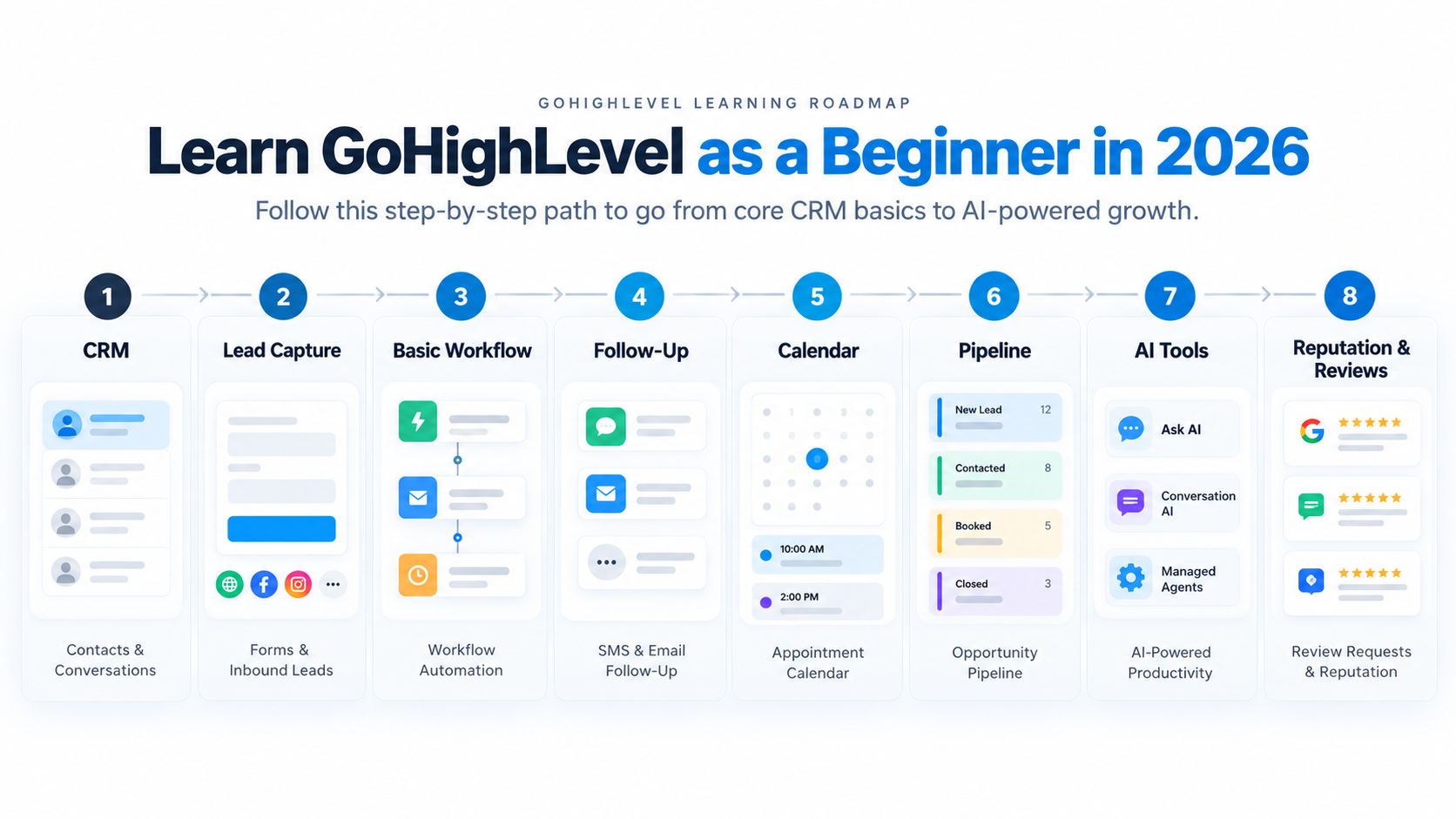
Start with the customer journey, not the feature menu. This recommended sequence moves from CRM basics into lead capture, simple automation, follow-up and only then into AI.
1. Understand the CRM
Learn contacts, conversations, opportunities, pipelines, tasks and notes. Before automating anything, understand where customer information lives and how a lead is represented inside the system.
2. Understand Lead Capture
Learn how forms, calendars, websites, funnels, inbound calls and messages can create or update contacts. The important concept is understanding what causes someone to enter the system.
3. Learn One Basic Workflow
Start with simple logic: a form is submitted, the contact is created or updated, an opportunity is created, the customer receives an acknowledgment and the team receives a notification.
4. Learn Follow-Up
Understand SMS, email, wait steps, conditions, reminders and what should stop an automated sequence when the customer replies, books or no longer needs follow-up.
5. Connect the Calendar
Learn how appointments connect with contacts, availability, confirmations and reminders. This turns the CRM from a database into part of an actual customer journey.
6. Understand Pipelines
Learn how opportunities move through stages so the business can see whether a lead is new, contacted, booked, active, completed or in another meaningful stage.
7. Add AI Where It Has a Clear Job
Once triggers, actions, contacts and pipelines make sense, explore Ask AI, AI-assisted workflow creation, Conversation AI, Voice AI, Managed Agents and AI-agent actions inside workflows.
8. Learn Reputation and Reviews
Understand how review-request workflows can connect a completed customer experience with reputation management without treating reputation as a separate afterthought.
9. Leave Advanced Agency Features for Later
Snapshots, SaaS Mode, white labeling, client rebilling, custom objects, complex integrations and advanced agent architecture matter for certain users, but they should not distract a beginner from learning the core system first.
Visual Learning Map
The GoHighLevel Beginner Roadmap
A useful way to think about HighLevel is as a sequence rather than a dashboard full of unrelated features.
Start with the CRM. Understand how inquiries enter. Build one predictable workflow. Add follow-up and appointments. Organize the pipeline. Then introduce AI where interpretation or conversational interaction genuinely improves the process.
Your First Automation
Workflows Make More Sense When You Start Small
A beginner does not need a twenty-step automation to understand HighLevel.
One of the clearest examples is:
That sequence introduces the basic concepts behind much of HighLevel automation:
Trigger: what starts the workflow;
Actions: what the system does afterward;
Contact data: which customer record the workflow uses;
Pipeline: where the opportunity belongs;
Communication: what the customer receives; and
Internal notification: what the team needs to know.
HighLevel’s Ask AI workflow creation can help create workflows from natural-language instructions. A user can describe the desired automation, review the generated workflow and continue editing it in Workflow Builder.
That reduces blank-canvas work, but beginners should still understand triggers, actions, timing, conditions and testing. AI can help draft the workflow; the user still needs to understand what the workflow is intended to do before publishing it.
Use the Trial to Learn One Real Customer Journey
Instead of spending the trial exploring every menu, use the Bootcamp as a guided introduction and use the extended trial to understand your CRM, connect one lead source and test a simple path from inquiry to follow-up.
Learn HighLevel Through the Bootcamp
Quick Check
GoHighLevel Beginner Trivia
True or false: A beginner should learn AI tools before understanding contacts, workflow triggers, actions and pipelines.
Reveal the answer
False. Learn the CRM and basic workflow logic first. Then add AI to a specific task and review and test what it builds.
HighLevel AI in 2026
Where AI Fits After You Understand the Basics
HighLevel's AI products now cover several different jobs. They should not all be described as the same type of AI agent.
HighLevel AI Tool | What It Does | What a Beginner Should Know |
|---|---|---|
Ask AI | HighLevel's in-platform AI assistant. It can answer questions, create content, retrieve supported platform information and perform supported CRM or platform actions from natural-language requests. | Think of it primarily as an assistant for the person using HighLevel rather than a customer-facing chatbot. |
Workflow Creation with Ask AI | Users can describe an automation in natural language, review the generated workflow, request changes and then continue editing and testing it in Workflow Builder. | This reduces blank-canvas setup but does not eliminate the need to understand triggers, actions, timing and testing. |
Conversation AI | Customer-facing conversational AI that can respond to supported inbound messages, answer configured questions, collect information and assist with appointment booking and routing. | This is different from Ask AI because it is designed to interact with contacts rather than primarily assist the logged-in user. |
Voice AI | AI-powered voice functionality for supported calling experiences and real-time voice interactions. | Useful to understand as part of the platform, but not necessary for learning the CRM or your first workflow. |
Managed Agents | Managed Agents is HighLevel's current terminology for the product previously called Super Agents. They can use instructions, knowledge, CRM actions and connected tools to perform more flexible multi-step work. | This is an advanced layer. Learn ordinary CRM and workflow logic first. |
AI Agent Workflow Actions | Workflows can invoke AI-agent reasoning for tasks that need flexible interpretation or tool use instead of a completely predefined sequence. | Do not confuse this with normal workflow automation. If every occurrence should produce the same predefined action, a standard workflow may be simpler. |
Managed Agent Workflow Actions | A published Managed Agent can be invoked from inside a structured workflow, and its output can be used by later workflow steps. | This allows predictable workflow logic and more flexible AI reasoning to work together without making the entire process autonomous. |
HighLevel is also expanding agent connections to external systems. Those capabilities may matter later for advanced implementations, but beginners do not need to begin with external tool connections, complex agent architecture or advanced integrations.
For a deeper look at current AI costs, see Agency AI Lab's GoHighLevel AI pricing guide.
Avoid Unnecessary Complexity
What Should You Not Learn First?
A beginner can safely leave several areas for later:
SaaS Mode & White Labeling
Important if you plan to resell software, but unnecessary if you are still learning how contacts and workflows behave.
Complex Agent Architecture
Managed Agents and advanced external tools can become powerful, but they make more sense after you understand the processes the agent is supposed to support.
Deeply Nested Workflows
More branches do not automatically make an automation better. Beginners learn more from a short workflow they can explain and test.
Advanced Custom Objects
Useful for certain data models, but ordinary contacts, opportunities and pipelines cover a large portion of beginner use cases.
Custom API Development
HighLevel has substantial integration capabilities, but learning APIs is not a prerequisite for understanding the platform's core business workflow.
Every AI Tool at Once
Start with the business problem. Use AI only when it improves a specific task rather than activating tools simply because they are available.
Agency AI Lab also maintains a HighLevel review: features, fit and limitations for readers who want to understand the platform's tradeoffs before committing.
Current Pricing
What Does GoHighLevel Actually Cost in 2026?
The monthly subscription is only one part of the cost picture.
Plan / Service | Current Public Price | Beginner Context |
|---|---|---|
Starter | $97/month | HighLevel currently positions Starter for smaller businesses and solo marketers. It includes core platform features and up to three sub-accounts. |
Unlimited | $297/month | Adds unlimited sub-accounts and additional agency capabilities, making it more relevant to agencies managing multiple clients. |
Agency Pro | $497/month | Adds SaaS Mode, automated sub-account creation, advanced API access and additional rebilling capabilities. |
AI Employee Growth | $50/month per enabled location | Includes allowances across several AI products. Additional usage may generate separate charges depending on the product and usage level. |
AI Employee Unlimited | $97/month per enabled location | Includes broader AI usage for specified products subject to HighLevel's current fair-use and product-specific limits. |
HighLevel also offers pay-per-use AI options, so a monthly AI add-on is not always required.
Beginners should understand that subscription price and operating cost are not always the same number.
Phone calls and SMS can carry separate usage charges. LC Email currently charges based on email volume. Certain premium workflow triggers and actions can incur per-execution charges. AI products may be included, limited, token-based, usage-based or separately billed depending on the product and plan.
HighLevel’s current LC Email rate is $0.675 per 1,000 emails. Premium workflow executions can also carry separate charges depending on the feature and billing tier.
That does not mean every account will incur every fee. The useful approach is to estimate the subscription plus the communication, automation and AI services the actual workflow will use.
For more detail, see the Agency AI Lab HighLevel AI pricing breakdown.
Platform Fit
Who Is GoHighLevel a Good Fit For?
Often Worth Evaluating
marketing agencies;
consultants;
local service businesses;
appointment-driven businesses;
real estate professionals;
mortgage professionals using it around—not instead of—their specialized loan systems;
businesses with substantial lead follow-up needs; and
teams using several disconnected marketing and communication tools.
May Be More Than You Need
someone who only needs a basic contact database;
a business with almost no incoming lead flow;
a company already deeply standardized on another enterprise CRM;
someone expecting a completely configured system with no setup;
a business whose essential workflow depends on specialized industry software HighLevel does not replace; or
someone who has no use for automation, messaging, scheduling or marketing workflows.
HighLevel can consolidate a meaningful amount of software for the right business. That does not mean every business should replace every existing platform.
Current Beginner Questions
What Are New HighLevel Users Asking Right Now?
Useful questions to consider include:
What is the best way to learn GoHighLevel from scratch?
Should I learn CRM, funnels or workflows first?
Is there a sandbox or another way to practice?
Is the standard 14-day trial enough time to learn the platform?
Which features matter most if I want to work with clients?
Do I need coding skills?
How should I practice before building automations for a real business?
What does HighLevel actually replace?
How much does it cost once usage charges are included?
How do the newer AI tools differ from ordinary workflows?
Those questions point to the same underlying problem: access to the platform is not usually the difficult part. Deciding what to learn—and in what order—is.
Use the Extended Trial Deliberately
A Practical 30-Day GoHighLevel Beginner Roadmap
If you use the current Bootcamp 30-day trial, treat the month as a learning sequence rather than a deadline to activate every feature.
This roadmap is Agency AI Lab's suggested learning order, not HighLevel's official Bootcamp curriculum.
Days 1–3
Understand the CRM
Learn contacts, conversations, opportunities, pipelines, tasks and basic account structure. Decide what a lead should look like inside the system.
Days 4–7
Connect Lead Capture and Booking
Understand where inquiries come from and how forms, calendars or other lead sources create contacts and appointments.
Week 2
Build and Test Your First Workflow
Use one real business scenario. Keep it simple enough that you can explain exactly what triggers the workflow and why each action occurs.
Week 3
Add Follow-Up and Selected AI
Improve your messages, reminders and workflow logic. Explore Ask AI or customer-facing AI only where there is a specific reason to use it.
Week 4
Test the System and Decide
Run realistic test contacts through the customer journey. Check workflow timing, messages, pipeline changes, calendar behavior and actual usage costs. Then decide whether HighLevel fits the business well enough to continue.
This is a learning framework, not a promise that every business should complete the same configuration in thirty days.
The Decision
Is the GoHighLevel Bootcamp Worth Using?
The Bootcamp may be particularly useful for a first-time HighLevel user who wants a guided introduction instead of spending the first several days trying to understand the platform alone.
The extended trial is also practical. The standard public HighLevel trial is currently 14 days, while the verified Bootcamp path currently provides 30 days. That gives a beginner additional time to learn the CRM, attend the live Bootcamp, test a workflow and decide whether the platform fits.
Someone who already knows HighLevel well may get less value from beginner training. Someone who only needs a very basic CRM may discover that HighLevel is more platform than they need.
The Bootcamp is best viewed as a guided starting point, while the extended trial gives you more time to apply what you learn to a real business process.
GoHighLevel Bootcamp
Learn HighLevel With a Guided Starting Point
The current Bootcamp path provides a 30-day HighLevel trial plus live guided training. Use the extra time to understand the CRM, test a practical workflow and decide whether HighLevel belongs in your business.
Start GoHighLevel Through the Bootcamp
HighLevel states that subscription charges do not apply during the trial; usage-based communication charges may apply. Confirm current offer terms on the signup page.
Frequently Asked Questions
GoHighLevel Bootcamp FAQ
What is the GoHighLevel Bootcamp?
The current HighLevel Bootcamp is a live guided training experience available through a special signup path. The current offer includes a 30-day HighLevel trial and an interactive live session designed to introduce users to practical parts of the platform.
Does the Bootcamp include a 30-day HighLevel trial?
Yes. As reviewed on October 12, 2026, the verified Bootcamp signup page advertises a 30-day trial. HighLevel's standard public trial remains 14 days. Offer terms can change, so confirm them on the signup page before registering.
Does the Bootcamp teach every part of GoHighLevel?
No. The current Bootcamp is a guided introduction rather than a complete course covering every HighLevel feature. This article's CRM-first roadmap is Agency AI Lab's recommended learning sequence for continuing beyond the live session.
Do I need technical or coding skills to learn GoHighLevel?
Coding is not required for the core CRM, calendar, forms and workflow experience. More advanced integrations and customization can become technical, but beginners can learn the basic customer journey without writing code.
Should a beginner learn workflows or AI first?
Learn basic workflow logic first. Understand triggers, actions, contacts, pipeline stages, conditions and testing. HighLevel's newer AI tools can make workflow creation easier, but understanding the underlying process makes it much easier to review what AI builds.
What is the difference between Ask AI and Conversation AI?
Ask AI is primarily an in-platform assistant for the HighLevel user. Conversation AI is designed primarily for customer-facing interactions through supported communication channels.
Are Managed Agents the same as Super Agents?
Managed Agents is HighLevel's current terminology for the product previously called Super Agents. They represent a more advanced agentic layer that can use instructions, knowledge and connected actions to perform multi-step CRM and business tasks.
Does HighLevel cost more than the monthly subscription?
It can. Phone, SMS, email, AI usage and certain premium workflow features may create additional charges depending on configuration and usage. Review current HighLevel billing documentation and account usage before estimating total operating cost.
Continue Learning
Related Agency AI Lab Guides
HighLevel Trial and Bootcamp Offer
HighLevel review: features, fit and limitations
GoHighLevel AI Pricing Explained
HighLevel review: features, fit and limitations
Agency AI Lab Found First & Authority Tree
Trusted Resources
AgencyAILab.com · CertainlySold.net · FLHomesMagazine.com · ElderPlacement.agency · Smart-N-Loans.com
